Designing Data-Intensive Applications (1)
Recently I have been reading the book “Designing Data-Intensive Applications”.
It covers a great deal, and while reading it I keep wondering why I only got around to reading it now.
It contains many things I have experienced and worried about, so I started this post to organize the contents on my blog as I read.

In general, data-intensive applications are built from standard building blocks that provide commonly needed functionality.
- Store data (database: MySQL, Oracle, MongoDB, etc.)
- Remember the result of an expensive operation (cache: Redis, Memcached, etc.)
- Let users search data by keyword or filter it (search index: Elasticsearch, Solr, etc.)
- Send a message to another process for asynchronous handling (Kafka, RabbitMQ, etc.)
- Periodically crunch a large amount of accumulated data (MapReduce, etc.)
These components now feel completely obvious. Most engineers implement the functions above using well-built tools.
However, it is not as easy as it sounds. Each application has different requirements, so you have to think about which tool and which approach fit best.
Thoughts on data systems
Many new tools for data storage and processing have appeared recently. They are optimized for a variety of use cases, so they no longer fit neatly into traditional categories. Also, no single tool can satisfy all data processing and storage needs anymore. Instead, the trend is to split the work into several tasks and use different tools that can handle each task.
The new tools are optimized for various use cases, so they no longer fit neatly into traditional categories.
For example, there is Redis used as a message queue, and there is Kafka, which guarantees durability like a database. In other words, the boundaries between categories are blurring.
The various tools communicate through their own APIs, and the developer performs actions such as deleting or updating the cache so that clients see consistent results.
Designing such a system requires considering several things.
- How can you keep data safe and correct even when something goes wrong internally?
- Can you consistently provide good performance to clients even when part of the system is degraded?
- How can you scale?
- What does a good API for the service look like?
This book focuses on three concerns that matter in most software systems.
- Reliability
- The system should work correctly even in the face of adversity such as hardware or software faults, and even human error.
- Scalability
- As the system’s data volume, traffic volume, or complexity grows, there should be reasonable ways of dealing with that growth.
- Maintainability
- Over time, many different people will work on the system, so you should make it possible for all of them to work on it productively.
Reliability
For software, the typical expectations are as follows.
- The application performs the function the user expected.
- The system tolerates mistakes made by the user or unexpected ways of using the software.
- The system performance is good enough for the required use case, under the expected load and data volume.
- The system prevents unauthorized access and abuse.
If the expectations above mean “working correctly”, reliability can roughly be understood as “continuing to work correctly even when things go wrong”.
Things that can go wrong are called faults. A system that can anticipate and cope with faults is said to be fault-tolerant or resilient. A fault is also not the same as a failure: a fault is one component of the system going wrong, while a failure is the whole system stopping and failing to provide the required service to the user. Reducing the probability of a fault to 0 is impossible, so it is best to design a fault-tolerant architecture so that faults do not cause failures.
It is also a good approach to deliberately induce faults, continuously exercising and testing the fault-tolerant system so that it handles faults correctly when they occur naturally.
Netflix’s Chaos Monkey is an example of this approach.
Hardware faults
- Average failure rate of hard disks: the mean time to failure is reported as 10 to 50 years. So in a storage cluster of 10,000 disks, you can expect one disk to die per day.
To reduce the system failure rate, the common approach is to add redundancy to each hardware component. Set up RAID, and use dual-power devices and hot-swappable CPUs for servers. A system with redundant hardware has operational advantages. When a machine must be rebooted (patched), a single-server system needs planned downtime, but a system that can tolerate machine failure can be patched one node at a time without downtime for the whole system.
Software errors
- A software bug that causes every application server instance to crash when given a particular bad input
- A process that uses up a shared resource such as CPU time, memory, disk space, or network bandwidth
- A service that slows down, becomes unresponsive, or returns corrupted responses
- A cascading failure, where a small fault in one component triggers a fault in another component, which in turn triggers more faults
There is no quick solution to the problem of systematic errors in software. You have to think carefully about the assumptions and interactions in the system, test thoroughly, isolate processes, allow crashed processes to restart, and measure and monitor system behavior in production.
Human errors
- Design systems in a way that minimizes the opportunities for error.
- Isolate the parts where human mistakes can cause failures.
- Test thoroughly at all levels, from unit tests to whole-system integration tests and manual tests.
- Allow quick and easy recovery from human errors.
- Set up detailed and clear monitoring, such as performance metrics and error rates.
- Implement operations training and practice.
How important is reliability?
In business applications, bugs cause lost productivity, and outages are costly in that they cause lost revenue and damage reputation. Even non-critical applications have a responsibility to their users.
There are situations where reliability is sacrificed to reduce the operating cost of a prototype or a service with a very small profit margin. In that case, however, you need to know very well when it is appropriate to cut costs.
Scalability
A system that works reliably today does not necessarily work reliably in the future. One common reason for degradation is increased load.
Scalability describes a system’s ability to cope with increased load.
Describing load
You need to describe the system’s current load succinctly. Only then can you discuss load growth questions (what happens if the load doubles?).
Load can be described with a few numbers called load parameters.
- Requests per second to a web server
- The ratio of reads to writes in a database
- The number of simultaneously active users in a chat room
- The hit rate on a cache
Describing performance
Once you have described the system load, you can investigate what happens when the load increases. You can look at it in the following two ways.
- When you increase a load parameter and keep the system resources (CPU, memory, network bandwidth, etc.) unchanged, how is the system performance affected?
- When you increase a load parameter, how much do you need to increase the resources if you want to keep performance unchanged?
Both questions need performance numbers like the following.
- Throughput: the number of records that can be processed per second, or the total time it takes to process a dataset of a certain size
- Response time: the time between a client sending a request and receiving a response
You will probably use the average a lot, but it is better to use percentiles than the average. If you take the list of response times and sort it from fastest to slowest, the midpoint is the median. For example, if the median is 200 ms, half of user requests return in less than 200 ms and the other half take longer.
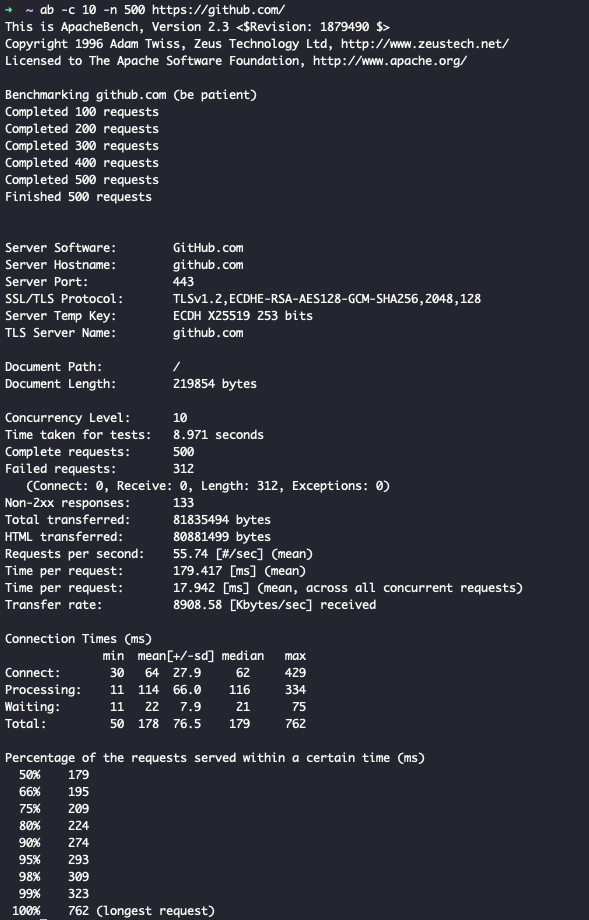
If you run the apache ab test, it shows response times as percentiles, which gives more information than the average. (If you add the -e csv-file option, you can see 1 to 100%.)
Approaches for coping with load
There are 2 representative ways to cope with increased load.
- scaling up
- Upgrade to a higher-performance machine
- scaling out
- Add machines with similar performance
Scaling up is the approach commonly used for systems that are hard to partition, and scaling out is useful for systems that can be partitioned. No matter how much you scale up, a single server has limits, so it is good to build a system that can scale out across distributed servers.
Maintainability
Most of the cost of software is not in its initial development but in its ongoing maintenance. This maintenance includes fixing bugs, keeping systems operational, investigating failures, adapting to new platforms, repaying technical debt, and adding new features.
To design to minimize the pain of maintenance, there are three software system design principles to pay attention to.
- Operability
- Make it easy for the operations team to keep the system running smoothly.
- Simplicity
- Remove as much complexity as possible from the system so that new engineers can easily understand it.
- Evolvability
- Make it easy for engineers to change the system in the future.
Operability: making operations easy
Good operability means making routine tasks easy so that the operations team can focus its effort on high-value activities.
Simplicity: managing complexity
Complexity can be broadly divided into 2 kinds.
- Essential complexity: complexity that comes from the inherent problem the application has to solve
- Accidental complexity: complexity that comes from the tools used to develop the application
As a project grows, the system becomes very complex and hard to understand. Complexity shows up in various symptoms: an explosion of the state space, tight coupling between modules, tangled dependencies, inconsistent naming and terminology, hacks aimed at solving performance problems, and special cases that work around problems ad hoc.
Reducing complexity greatly improves software maintainability. Therefore, simplicity should be a key goal of the system you are building.
The best tool for removing complexity is abstraction. A good abstraction can hide a great deal of implementation detail behind a clean, intuitive facade.
Evolvability: making change easy
System requirements change constantly. Making data system changes easy is closely tied to the system’s simplicity and abstraction. A system that is easy to understand is easy to modify.
You can make the system easier to modify by using methods like the following.
- TDD(test-driven development)
- Refactoring