Electron main process and renderer process
When developing an app with Electron, the renderer process, which handles the actual view, has many restrictions. It cannot hold cookie values, and most other Electron libraries must also run in the main process.
So this time I want to build a todo app and learn how the renderer process and the main process communicate with each other.
First, let’s create a BrowserWindow in the main process.
let mainWindow;
function createWindow () {
  mainWindow = new BrowserWindow({width: 400, height: 760, icon: path.join(__dirname, 'app/img/icon.png')});

  mainWindow.loadURL(url.format({
    pathname: path.join(__dirname, 'app/index.html'),
    protocol: 'file:',
    slashes: true
  }));

  mainWindow.on('closed', function () {
    mainWindow = null;
  });
  mainWindow.setResizable(false);
  mainWindow.setMenu(null);
}
The index.html in app will be the todo app, and I wrote it with AngularJS.
<!DOCTYPE html>
<!--index.html-->
<html ng-app="todoApp">
<head>
  <link rel="stylesheet" href="https://maxcdn.bootstrapcdn.com/bootstrap/3.3.2/css/bootstrap.min.css">
  <link rel="stylesheet" href="app.css">
  <script src="https://ajax.googleapis.com/ajax/libs/angularjs/1.6.7/angular.min.js"></script>
  <script src="app.js"></script>
</head>

<body>
  <div id="todo" ng-controller="TodoListController as todoList">
    <div class="todoHeader">
      <h2>Todo</h2>
      <form ng-submit="todoList.addTodo()">
        <div class="input-group">
          <input class="todoInput form-control" type="text" ng-model="todoList.todoText" placeholder="add new todo here">
          <div class="input-group-addon"><input class="btn btn-primary" type="submit" value="add"></div>
        </div>
      </form>
    </div>
    <ul class="todoList">
      <li class="done-{{todo.done}}" ng-repeat="todo in todoList.todos | filter:statusFilter">
        <div class="input-group">
          <div class="input-group-addon">
            <input class="itemChk" type="checkbox" ng-model="todo.done" ng-change="todoList.doneTodo(todo)">
          </div>
          <span>{{todo.text}}</span>
          <span>{{todo.date | date:'yyyy-MM-dd HH:mm:ss'}}</span>
          <div class="input-group-addon">
              <button type="button" class="btn btn-danger" ng-click="todoList.removeTodo(todo)">X</button>
          </div>
        </div>
      </li>
    </ul>
    <div class="todoFooter">
        <button type="button" class="btn btn-primary" ng-click="statusFilter={done:false}">TODO</button>
        <button type="button" class="btn btn-success" ng-click="statusFilter={done:true}">DONE</button>
        <button type="button" class="btn btn-info" ng-click="statusFilter={}">ALL</button>
    </div>
  </div>
</body>
</html>
The HTML document is used as ng-app, and div#todo uses TodoListController as its ng-controller.
Inside TodoListController, I write code that communicates with the main process at startup to load the saved todo list.
The main process and the renderer process communicate by using ipcRenderer and ipcMain.
The usage is as follows.
// inside the main process
const {ipcMain} = require('electron')
ipcMain.on('asynchronous-message', (event, arg) => {
  console.log(arg)  // prints "ping".
  event.sender.send('asynchronous-reply', 'pong')
})

ipcMain.on('synchronous-message', (event, arg) => {
  console.log(arg)  // prints "ping".
  event.returnValue = 'pong'
})

// inside the renderer process (web page)
const {ipcRenderer} = require('electron')
console.log(ipcRenderer.sendSync('synchronous-message', 'ping')) // prints "pong".

ipcRenderer.on('asynchronous-reply', (event, arg) => {
  console.log(arg) // prints "pong".
})
ipcRenderer.send('asynchronous-message', 'ping')
Now it communicates with the main process through ipcRenderer on a channel named loadTodo.
// app.js -> renderer process
let todoList = this;
todoList.todos=[];
angular.forEach(ipcRenderer.sendSync('loadTodo'), function(todo) {
    todoList.todos.push(todo);
});

//main.js -> main process
ipcMain.on('loadTodo', (event, arg) => {
    console.log("start");
    storage.getAll(function(error, data) {
        if (error) throw error;
        event.returnValue = data;
    });
});
When the renderer process makes a request, the main process loads the saved json data and sends it back.
The todo list is saved as json, and I use electron-json-storage for this.
With storage, the todo list can be saved to and loaded from the internal local storage.
I originally planned to save and load data through a server using mongodb, but I changed my mind and decided to build a standalone app that runs without a server.
If you want to save the todo list by communicating with a server, it seems you can implement login and have the main process communicate with the server using a session key.
Back to the main topic, let’s look at the part that saves and deletes.
// app.js -> renderer process
todoList.addTodo = function() {
    todo={text:todoList.todoText, date:Date.now(), done:false};
    ipcRenderer.send('addTodo', todo);
    todoList.todos.push(todo);
    todoList.todoText = '';
};
todoList.removeTodo = function(todo){
    let idx = todoList.todos.findIndex(function(item){
        return item == todo;
    });
    if(idx>-1) {
        todoList.todos.splice(idx,1);
        ipcRenderer.send('removeTodo', todo.date);
    }
};
todoList.doneTodo = function(todo){
    doneTodo={text:todo.text, date:todo.date, done:todo.done};
    ipcRenderer.send('addTodo', doneTodo);
};

//main.js -> main process
ipcMain.on('addTodo', (event, arg) => {
    storage.set(String(arg.date), arg, function(error) {
        if (error) throw error;
    });
});

ipcMain.on('removeTodo', (event, arg) => {
    storage.remove(String(arg), function(error) {
        if (error) throw error;
    });
});
The renderer process has addTodo, removeTodo, and doneTodo.
When the app first starts, it loads the todo list through the loadTodo channel and stores it in an internal json array. So when addTodo or removeTodo is called, it first adds or removes the item in the internal array separately, and then communicates with the main process to save or delete the json data stored in local storage.
When saving, the json file name is set to a timestamp.
doneTodo is a function that saves a change to the done state of a todo. Because the checkbox is set with ng-model=”todo.done”, only the changed state needs to be saved to the internal local storage. It communicates over the addTodo channel here simply to overwrite the json file of the same name with the changed state.
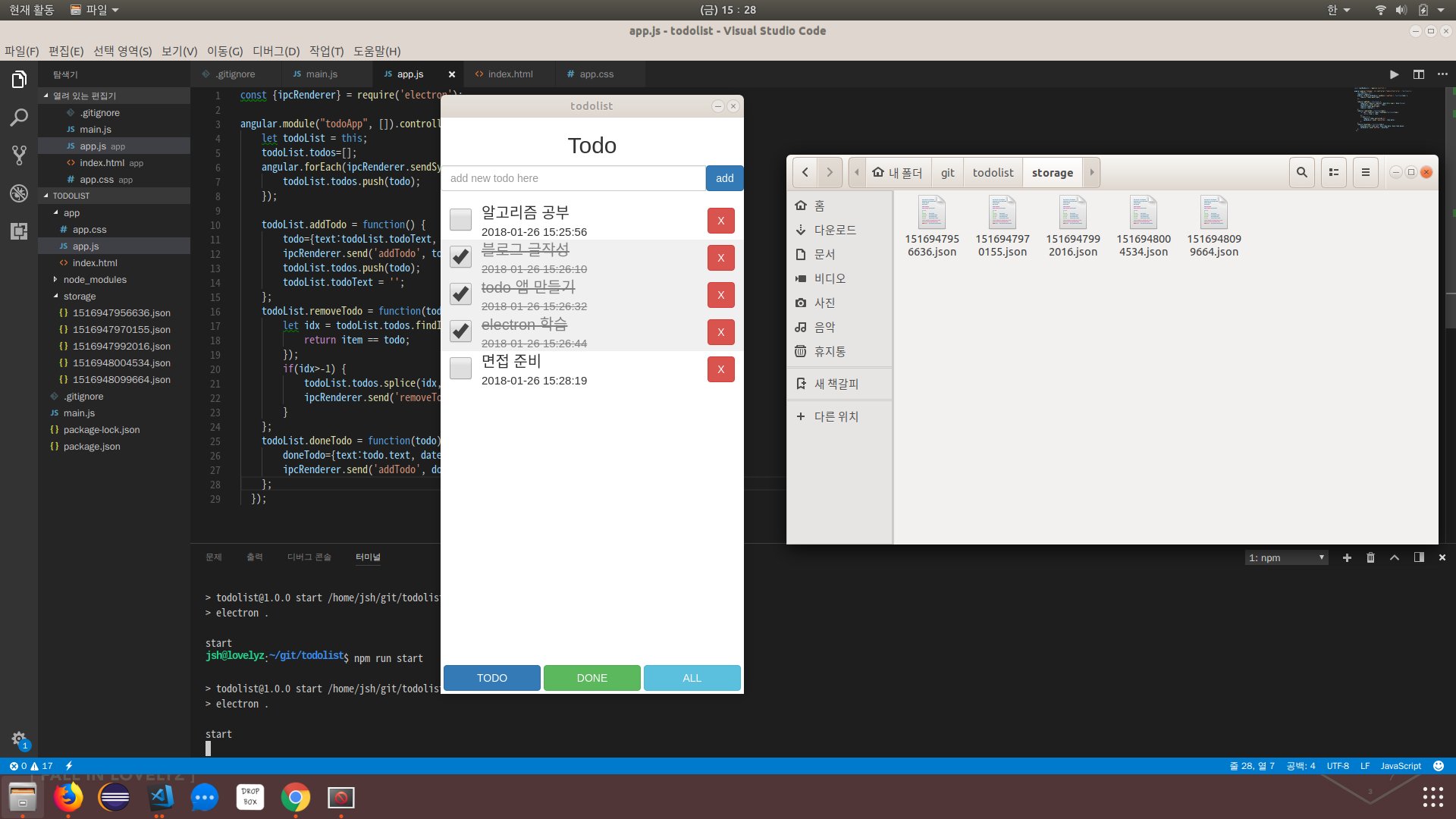
When the app runs, you can confirm that the todo list is saved correctly as json in the local storage.
Next, I should study more of Electron’s OS features.